
Xmake v3.1.1 Released, Addons Extend Xmake Itself
The headline of this cycle is addons. v3.1.0 reworked xmake plugin so that plugins could be distributed like packages; addons take that idea to its conclusion: an addon can carry not only a plugin, but rules, toolchains, project templates, lua modules and includes files — a complete development kit, installed with one command, or declared by a project and installed automatically.
Besides that, we added the package.host.install_locally policy, new cross-compilation architectures, a reworked template distribution, and a pkg package manager for BSD.
New Features
Addons
An addon extends xmake itself. Where a package provides libraries for your program, an addon provides new abilities for the build tool.
What an addon can carry
Every payload is optional, an addon ships only what it provides:
| Payload | What it becomes | Used as |
|---|---|---|
plugins/ | a new xmake command | xmake hello |
rules/ | a build rule | add_rules("@addon/my-addon/app") |
toolchains/ | a toolchain | set_toolchains("@addon/my-addon/mycc") |
templates/ | a project template | xmake create -t myapp |
modules/ | importable lua modules | import("@addon.my-addon.utils") |
includes/ | includable configuration | includes("@addon/my-addon/board") |
The payloads are namespaced through @addon/<name>/..., so two addons never collide. Plugins and templates are the exception — a command name is global — and an install which would shadow another addon's command is rejected.
Managing addons
$ xmake addon --install my-addon                         # from the repository index
$ xmake addon --install github:myrepo/my-addon           # from github, `#branch` works too
$ xmake addon --install https://github.com/user/repo.git # from any git url
$ xmake addon --install /path/to/my-addon                # from a local directory

$ xmake addon --list
$ xmake addon --search my
$ xmake addon --remove my-addon
$ xmake addon --upgrade
Declaring addons in a project
A project can declare what it needs, so a fresh clone does not have to install anything by hand — xmake fetches the missing addons when the project is loaded:
add_addons("my-addon 1.0.x")

includes("@addon/my-addon/board")

target("hello")
    add_rules("@addon/my-addon/app")
    add_files("src/*.c")
The resolved versions are written to xmake-addons.lock next to xmake.lua, so everyone who builds the project gets the same addon versions.
Writing an addon
An addon is a directory with a manifest and one or more payload directories — no build step, no registration:
my-addon/
├── addon.lua
└── src/
    ├── plugins/hello/
    ├── rules/app/
    ├── toolchains/mycc/
    ├── modules/
    ├── includes/board/
└── templates/c/foo/-- addon.lua
addon("my-addon")
set_homepage("https://github.com/me/my-addon")
set_description("What this addon provides, one line.")
set_license("Apache-2.0")
set_sourcedir("src")
add_deps("serial-tools")The addon names itself in the manifest, so its name never depends on the repository or on the package that distributes it. Inside the addon, always reference yourself with @self:
import("@self.private.board")Test it exactly the way a user installs it:
$ xmake addon --install .
$ xmake addon --remove my-addon
Publishing to xmake-repo
Addons live in addons/<first-letter>/<name>/xmake.lua, beside the C/C++ packages, and reuse the whole package infrastructure — versions, sha256 verification, dependencies, mirrors:
package("my-addon")
    set_kind("addon")
    set_homepage("https://github.com/me/my-addon")
    set_description("What this addon provides, one line.")
    set_license("Apache-2.0")

    add_urls("https://github.com/me/my-addon/archive/refs/tags/$(version).tar.gz",
             "https://github.com/me/my-addon.git")
    add_versions("v1.0.0", "<sha256>")

    add_deps("serial-tools", {kind = "addon"})

    on_test(function (package)
        assert(package:has_addon({rules = "app", toolchains = "mycc"}))
    end)
The addon apis at a glance
Three places, a handful of interfaces:
-- 1. in xmake.lua, what a project needs
add_addons("my-addon 1.0.x")-- 2. in addon.lua, what an addon is
addon("my-addon")
set_description("...") -- shown by `xmake addon --list`
set_homepage("...")
set_license("Apache-2.0")
set_sourcedir("src") -- the payload root inside the repository
add_deps("serial-tools") -- other addons this one needs
add_globalmodules("detect.tools.find_mytool") -- only for the lookups xmake does by name-- 3. in the xmake-repo recipe, how it is distributed
package("my-addon")
set_kind("addon")
add_versions("v1.0.0", "<sha256>")
add_deps("serial-tools", {kind = "addon"})
on_test(function (package)
assert(package:has_addon({rules = "app", toolchains = "mycc"}))
end)And from a script, core.package.addon answers the runtime questions:
import("core.package.addon")

addon.owner()          -- the addon which owns the running script
addon.addons()         -- the installed addons and their payloads
addon.versions("yaml") -- the installed versions of one addon
addon.installdir()     -- ~/.xmake/addons
Why the payloads are namespaced
Everything an addon provides is reached through @addon/<name>/... or @addon.<name>.<module>, never through a bare name. Two addons can both ship a rule called app and nothing breaks. The only global names are the command names and the template ids, so those — and only those — are checked for conflicts when an addon is installed.
Inside an addon, code refers to itself with @self, so an addon never hardcodes its own name — and moving an addon to another repository changes nothing.
An addon can ship package definitions
A toolchain addon needs binaries. Instead of asking the user to install them, the addon carries the package recipes and exposes them through an includes file:
-- src/includes/packages/xmake.lua
package("mycc")
    set_kind("toolchain")
    add_urls("https://.../mycc-$(version).tar.gz")
    add_versions("1.0.0", "<sha256>")
    on_install(function (package)
        os.cp("*", package:installdir())
    end)
package_end()-- src/includes/board/xmake.lua
includes("../packages")
option("board", {default = "myboard", description = "Set the target board."})
add_requires("mycc", "myflasher")The project writes one line — includes("@addon/my-addon/board") — and gets the options, the toolchain and the flash tool.
The official addons
The first batch is already in xmake-repo:
| Addon | What it provides |
|---|---|
esp32-devel | the ESP32 toolchain, build rules, flashing and a blink template |
avr-devel | the same for the 8-bit AVR boards (uno / nano / mega2560) |
serial-tools | xmake monitor and a serial module the other addons reuse |
yaml | a yaml parser and emitter in pure lua, plus a cli |
xmake-harness | xmake ai, a terminal coding agent written in xmake lua |
format-plugin / doxygen-plugin / macro-plugin | the former builtin commands |
basic-templates | the templates which need an external sdk (sdl, qt, verilator) |
esp32-devel, for instance, carries the cross toolchain, the build rules, the flashing logic and the project template, so the whole ESP32 setup is:
$ xmake addon --install esp32-devel
$ xmake create -t esp32.blink -l c blink
$ cd blink
$ xmake f --board=esp32c3
$ xmake
$ xmake install                       # flash it to the board
xmake ai, an Agent Written in Xmake Lua
xmake-harness is the addon that shows how far this goes: a complete AI agent harness — session log, agent loop, tool pipeline, permission policy, sandbox, skills, subagents, slash commands and terminal ui — written entirely in xmake lua, with no third-party dependency. Installing it gives you xmake ai:
$ xmake addon --install xmake-harness
$ xmake ai --setup                     # provider, api key, model
$ xmake ai                             # interactive tui
$ xmake ai "add a unit test for foo"
$ xmake ai --print "what does this build?"   # non-interactive, for scripts and ci
It is an xmake addon, so it knows the project it sits in — and it can run the build without spending tokens on the output:
/xmake build                 run xmake here, the output goes to your terminal
/xmakedocs                   fetch the xmake documentation so it can look the apis up
/skills install xmake        load the xmake-skills pack
/model deepseek-reasoner     switch the model
/context                     what is using the context
Permission modes decide how much it may do on its own:
$ xmake ai --mode=plan           # read-only, plan first
$ xmake ai --mode=acceptedits    # auto-accept edits, still ask before commands
$ xmake ai --sandbox             # confine the commands it runs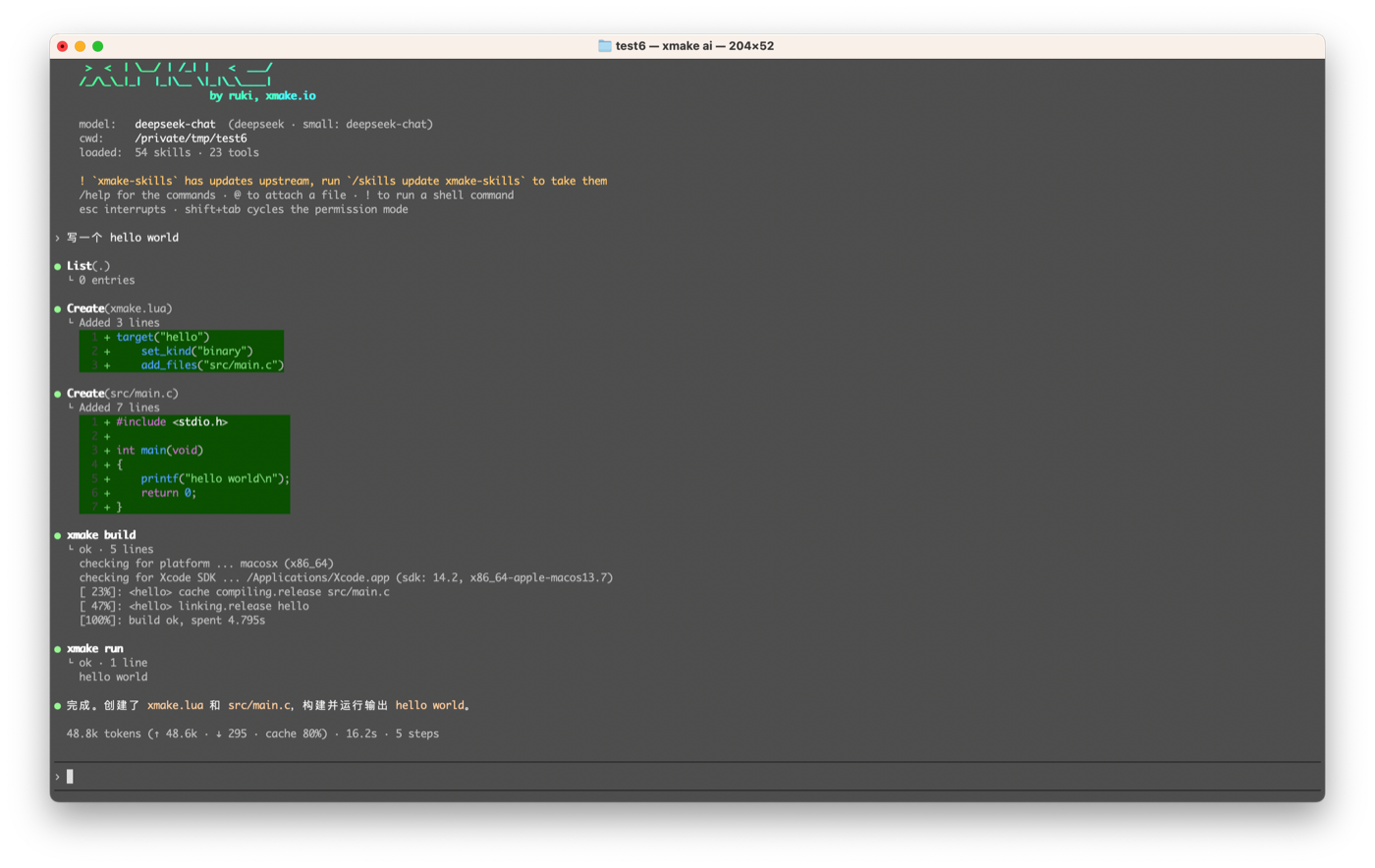
In the browser
The same agent also runs as a web ui:
$ xmake ai --web
$ xmake ai --web --port=9800 --cwd=/path/to/project
It serves a small http server on the loopback, prints a url carrying a per-run token and opens your browser on it. Same harness behind it — the same tools, skills, permission modes and session files — so it is a second front end, not a second agent, and it opens on the last conversation of the project rather than an empty one.
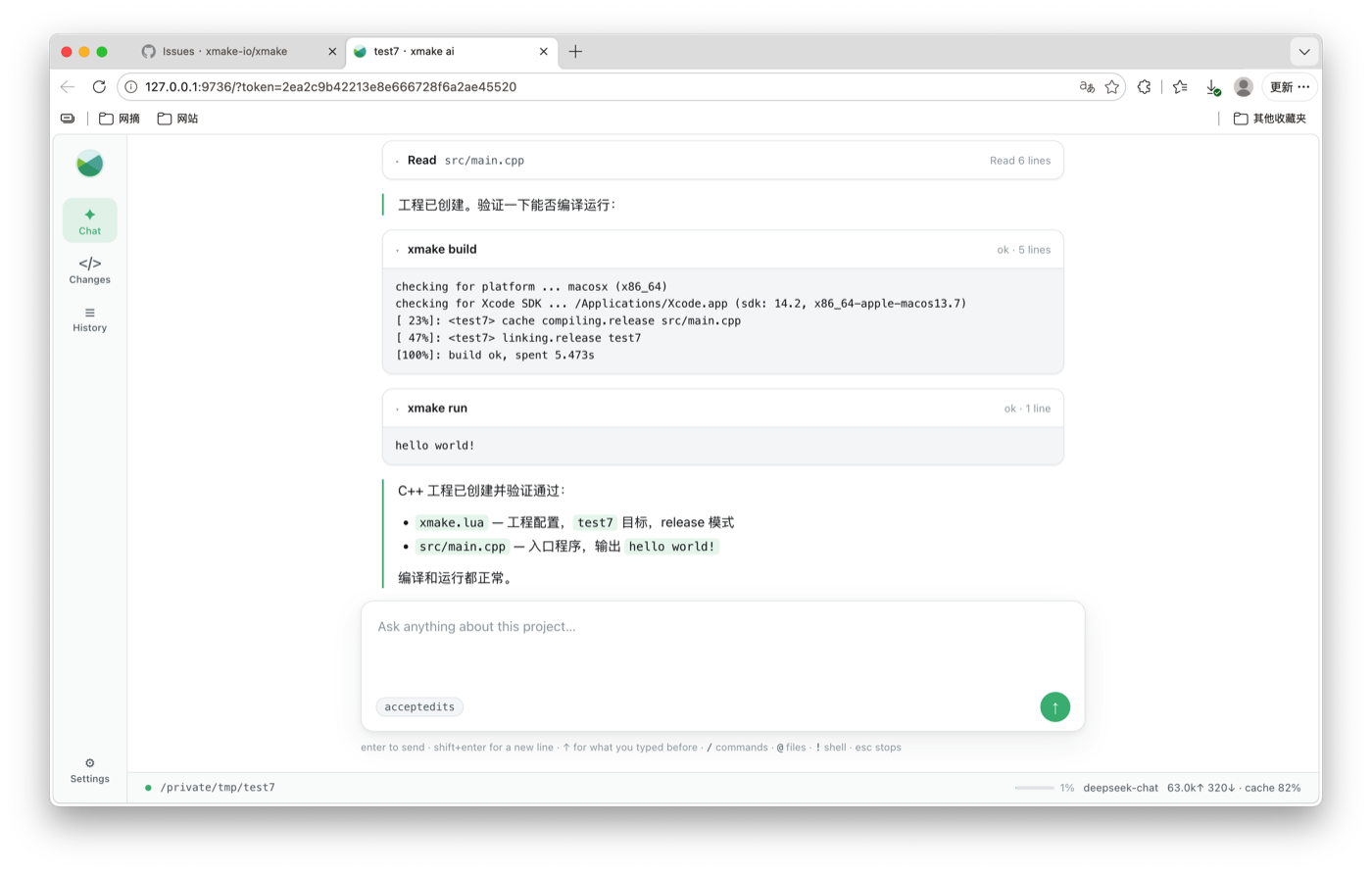
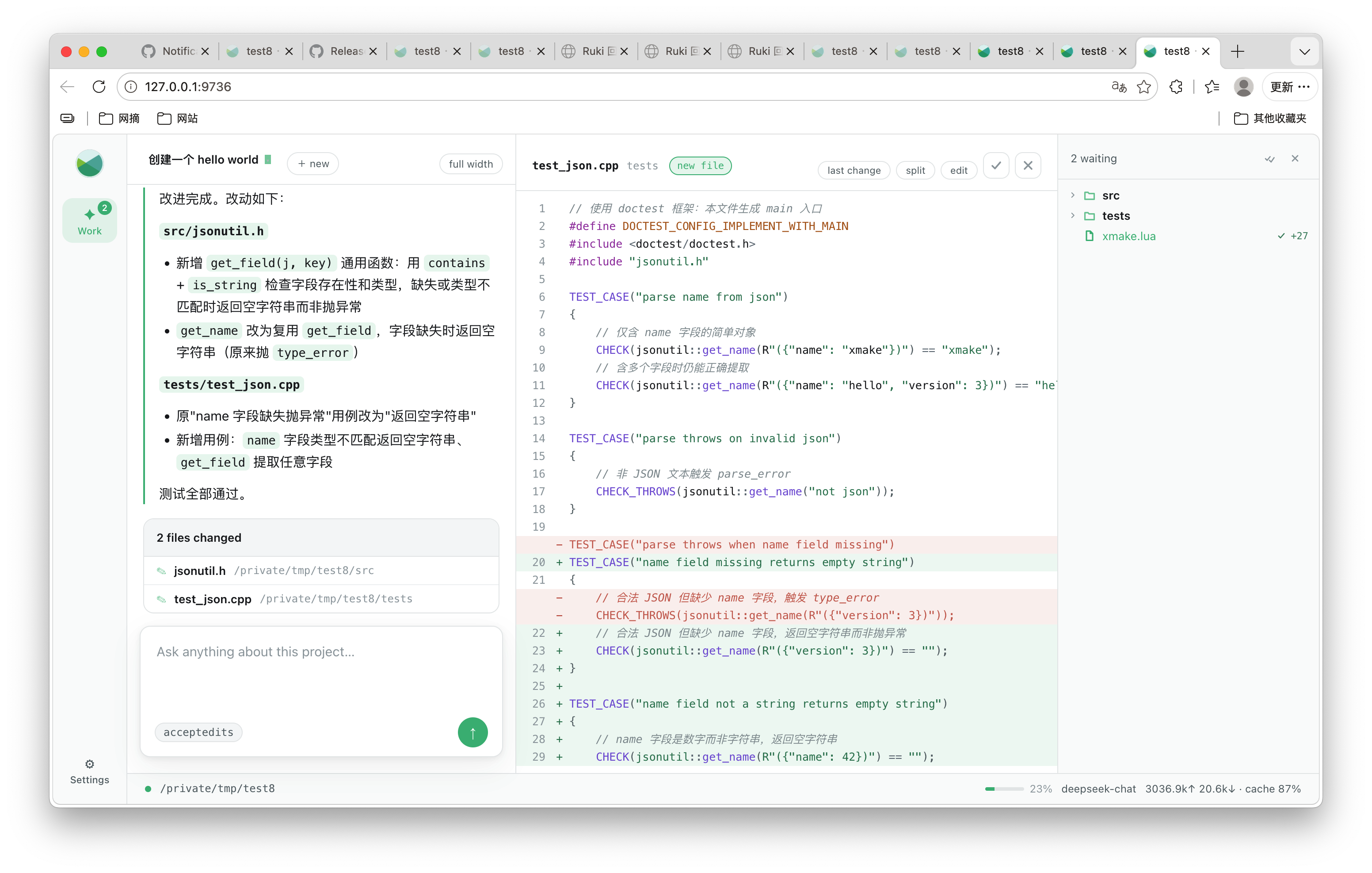
It starts as a conversation with the room to itself. When you go to look at what it changed, it opens out into a workspace: the conversation on the left, the file in the middle with what this conversation changed marked on it, and the project tree on the right. The file is editable, and a write from the page goes through the same door as a write from the agent:
Configuring it
The configuration is merged from five layers — the builtin defaults, ~/.xmake/harness/config.json, the project config, the XMAKE_HARNESS_* environment variables, and the command line. Only the user layer is written, so an api key never lands in a project repository:
$ xmake ai --config=providers.deepseek.apikey=sk-xxxxxx
$ xmake ai --provider=deepseek --model=deepseek-chat
$ xmake ai --smallmodel=deepseek-chat    # for titles, summaries and light subagents
$ xmake ai --showconfig
$ xmake ai --doctor                      # what is missing?
The builtin providers are deepseek (the default), anthropic, openai, moonshot, dashscope, siliconflow, openrouter and zhipu; any OpenAI-compatible endpoint works by setting a baseurl.
Sessions and skills
$ xmake ai -c                            # continue the last session of this directory
$ xmake ai -r                            # pick a session to resume
$ xmake ai --new                         # force a new one
$ xmake ai --list=skills                 # also: agents, tools, commands, providers, sessions
$ xmake ai --command=doctor              # run one slash command without entering the tui
Skills are fetched only when you ask for them, and xmake-skills is the pack that teaches it xmake:
/skills install xmake@see xmake-harness for the configuration layers, the providers and the whole command list.
The format / doxygen / macro Plugins Moved to Addons
These three commands used to be built into xmake even though most users never called them. They are addons now:
$ xmake addon --install format-plugin
$ xmake addon --install doxygen-plugin
$ xmake addon --install macro-plugin
The builtin versions still work but print a deprecation notice, and an installed addon takes over the command — the addon directories come first in the task search path now.
package.host.install_locally
package.install_locally keeps the packages of a project inside build/.packages instead of ~/.xmake/packages. But it applied to everything, including the cross toolchains, which are big, shared between projects, and have nothing to do with the project configuration.
Now it only affects the target-side packages. The host tools — anything xmake considers a host package, e.g. a toolchain — stay global, and get their own policy:
set_policy("package.install_locally", true)        -- library packages -> build/.packages
set_policy("package.host.install_locally", true)   -- and the toolchains too, if you want
So the common embedded setup finally expresses what people actually want: the source packages are local to the project, while the cross toolchain is downloaded once and reused.
New Cross-compilation Architectures
New architectures for the cross and linux platforms, e.g. SPARC64.
Reworked Template Distribution
The templates directory was reorganized and the distribution reworked, which is what makes the templates/ payload of an addon possible — the templates behind xmake create -t can now come from an addon instead of being built into the xmake installation.
pkg Package Manager for BSD
pkg is now a supported system package manager, so find_package and the package fallbacks work on FreeBSD and its relatives without a detour.
Improvements
Vector Extensions Propagate to Consumers
The vector extensions declared by a package (add_vectorexts) now reach the targets which use it, including through its components — a target that links a package built with avx2 gets the avx2 flags.
hlsl2spv / glsl2spv Run Before the Module Scan
The shader rules now run before the C++ module scan, so generated headers exist when the scanner looks at them.
Core
The interpreter's includes resolution, the project loading, the search cache and semver all got a round of improvements, together with a stricter conflict check for the global modules an addon exports — an addon can no longer shadow a module of xmake itself.
Changelog
New features
- #7696: Add addons support, to extend xmake with plugins, rules, toolchains, templates, modules and includes files
- #7702: Auto-install the addons declared by a project and lock them in
xmake-addons.lock - #7714: Support
add_addons(...)inxmake.lua - #7706: Add tests for addons
- #7707: Add tests for the package definitions shipped by addons
- #7717: Move the
format/doxygen/macroplugins to addons - #7723: Add new cross-compilation architectures, e.g. SPARC64
- #7721: Add the
package.host.install_locallypolicy - #7699: Rework the templates directory and template distribution
- Add the
pkgpackage manager for BSD
Changes
- #7719: Propagate the vector extensions of a package to its consumers
- #7713: Run
hlsl2spv/glsl2spvbefore the C++ module scan - #7722: Improve the interpreter, project loading, search cache and semver
- #7733: Check the name conflicts of the global modules of addons
- #7726: Improve the mingw toolchain for clang and libc++
Bugs fixed
- #7737: Fix the duplicated packages of the nested builds when installing them locally
- #7738: Fix the platform menu of the remote build, e.g.
xmake f -p windows --wdk=xxx - #7710: Fix the link name of libraries ending with
.lib - #7709: Fix the runtime flags of clang
- #7703: Fix wix to recognize
x86_64when passing-arch - #7701: Fix the dependency check to detect appended nested values
- #7698: Fix the semver version selection and build metadata sorting
- Fix
scheduler.co_resumeto raise the errors of the resumed coroutine