
xmake-harness (xmake ai)
xmake-harness is an AI agent harness written entirely in xmake lua, with no third-party dependency. Installed as an addon it provides xmake ai: a terminal coding agent which already sits inside your project and can build it.
It is two things at once:
- A generic agent framework — the session log, the agent loop, the tool pipeline, the permission policy, the sandbox, the skills, the subagents, the slash commands and the terminal ui.
- An xmake addon —
xmake ai, whose interaction follows Claude Code closely, with first-class knowledge of the xmake build.
Installation
$ xmake addon --install xmake-harness
$ xmake ai --setup
--setup is an interactive wizard: pick a provider, paste an api key, choose the models. You can also install it straight from the repository:
$ xmake addon --install github:xmake-addons/xmake-harnessConfiguration
The configuration is merged from five layers, later ones win:
- the builtin defaults
- the user config,
~/.xmake/harness/config.json - the project config,
<project>/.xmake-harness/config.json - the environment variables,
XMAKE_HARNESS_* - the command line options of
xmake ai
Only the user layer is written by the harness, so an api key never lands in a project repository.
$ xmake ai --config=providers.deepseek.apikey=sk-xxxxxx   # set one value and exit
$ xmake ai --config=ui.theme=light
$ xmake ai --apikey=sk-xxxxxx                             # key of the current provider
$ xmake ai --showconfig                                   # the resolved configuration
$ xmake ai --doctor                                       # check the environment
Inside the tui the same thing is reachable with /config, /model and /provider. /config never prints a key in full.
Providers and models
The builtin providers are deepseek (default), anthropic, openai, moonshot, dashscope, siliconflow, openrouter, zhipu and ollama. Any OpenAI-compatible endpoint works by setting a baseurl.
$ xmake ai --provider=deepseek --model=deepseek-chat
$ xmake ai --smallmodel=deepseek-chat     # used by the title/summary/light subagents
A small model is used for the cheap background work — session titles, summaries, light subagents — so the main model is spent only on the real task.
A local or LAN model, with no api key
ollama is a preset like the rest, and it carries a placeholder key: the OpenAI-compatible endpoint wants an Authorization header and does not care what is in it, so there is nothing to sign up for and nothing to set.
$ xmake ai -p ollama                                                    # on this machine
$ xmake ai --config=providers.ollama.baseurl=http://192.168.1.50:11434  # on another one
$ xmake ai --config=providers.ollama.models.main=qwen2.5-coder:14b
$ xmake ai --config=providers.ollama.models.small=qwen2.5-coder:7b
The base url is the host and port only — /v1/chat/completions is appended, which is where ollama serves its OpenAI-compatible api, so do not put /v1 in it. On the machine running ollama, it must listen on more than the loopback (OLLAMA_HOST=0.0.0.0 ollama serve) and the model you name must already be pulled.
The same applies to anything else which speaks that api — vllm, llama.cpp's server, LM Studio: kind = "openai", a base url, and a placeholder key.
Running it
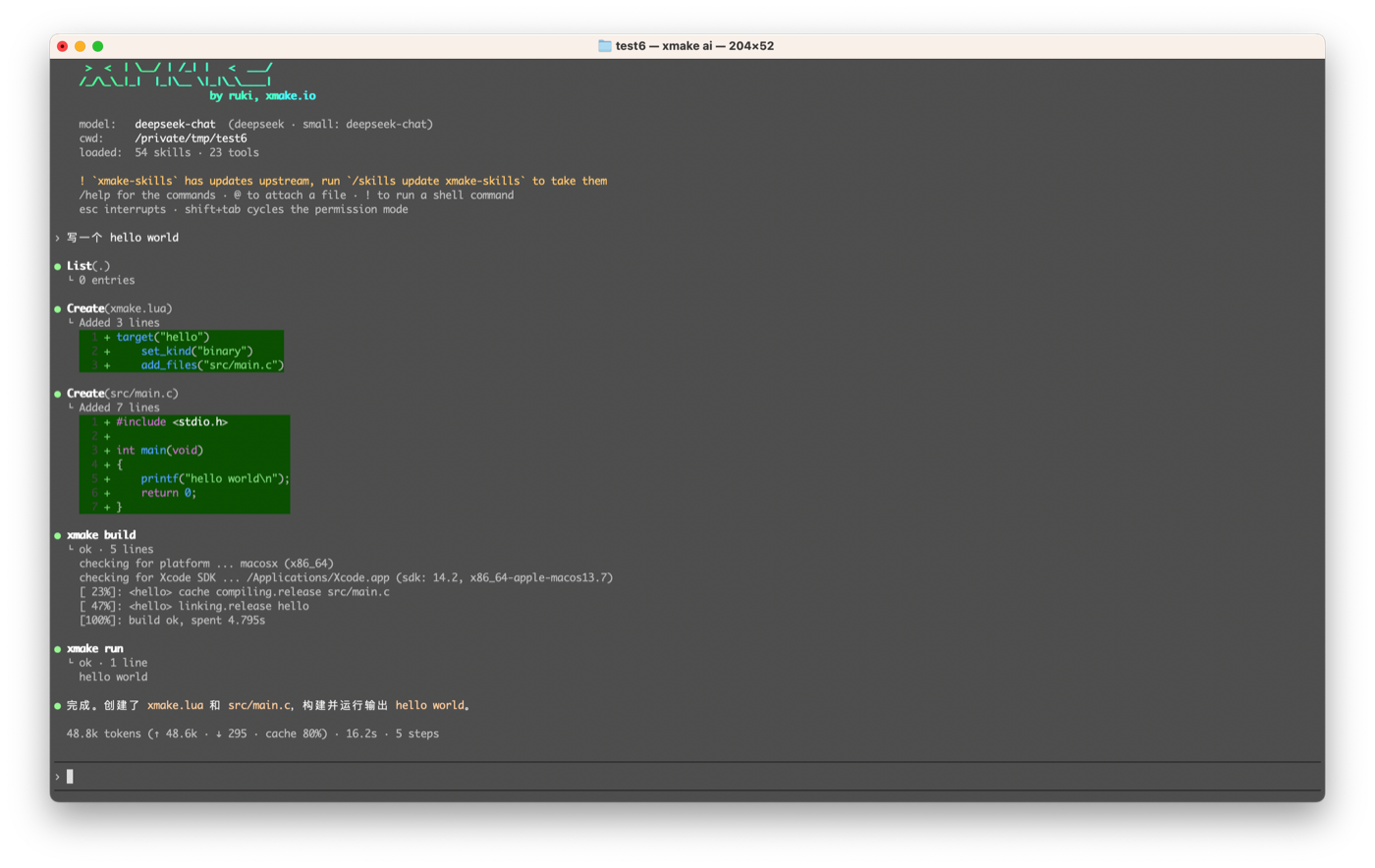
$ xmake ai                                   # interactive tui
$ xmake ai "add a unit test for foo"         # start with a prompt
$ xmake ai -c                                # continue the last session of this directory
$ xmake ai -c "and now add the tests"
$ xmake ai -r                                # pick a session to resume
$ xmake ai -r 6a86cfc5-bbda-14ce
$ xmake ai --new                             # force a new session
$ xmake ai --print "what does this build?"   # non-interactive, for scripts and ci
Sessions are per directory, so -c in another project continues a different thread.
The web ui
$ xmake ai --web                 # serve the ui and open the browser on it
$ xmake ai --web --port=9800     # take another port
$ xmake ai --web --nobrowser     # just print the url
$ xmake ai --web --cwd=/path/to/project
It starts a small http server on the loopback, prints a url which carries a per-run token, and opens your default browser on it:
  web ui  http://127.0.0.1:9736/?token=e07091070…
project /path/to/your/project| Option | Description |
|---|---|
--web | serve the web ui instead of the terminal ui |
--port=N | the port to take, 9736 by default (the first free one from there) |
--host=ADDR | where to listen, the loopback by default; 0.0.0.0 for every interface |
--nobrowser | do not open the browser, just print the url |
--cwd=DIR | the project to open, the current directory by default |
--mode=M | the permission mode to start in, acceptedits by default |
It opens on the last conversation of this project rather than an empty one, because a browser window survives a reload, a crash or a laptop waking up. --web --new starts a fresh one.
Reaching it from another machine
It listens on the loopback by default, because a service which edits files and runs commands is not something to put on a network by accident. There are two ways to reach it from elsewhere.
An ssh tunnel keeps it on the loopback, and is the one to prefer:
# on the remote machine
$ xmake ai --web --nobrowser

# on your machine
$ ssh -L 9736:127.0.0.1:9736 user@remote
Then open the url it printed in your local browser.
Or listen on a reachable address directly:
$ xmake ai --web --host=0.0.0.0        # every interface
$ xmake ai --host=192.168.1.7 --web    # just one of them
It then also prints the urls another machine can use, because 127.0.0.1 is the one url which does not work from anywhere else:
  web ui  http://127.0.0.1:9736/?token=e07091070…
  or      http://192.168.1.7:9736/?token=e07091070…

  it is listening on every interface: anything which can reach this machine
  can reach the harness, and only the token is in the way
NOTE
When it listens on a reachable address, the token in the url is the only thing between the harness and anybody who can reach the port. That url is read/write access to the files and a shell on that machine, it is not for sharing. On an untrusted network, use the ssh tunnel instead of --host=0.0.0.0.
This is a form of remote development in its own right: the sources, the builds and the agent all live on the remote machine and your laptop only runs a browser. It solves a different problem from remote compilation — the two are worth comparing.
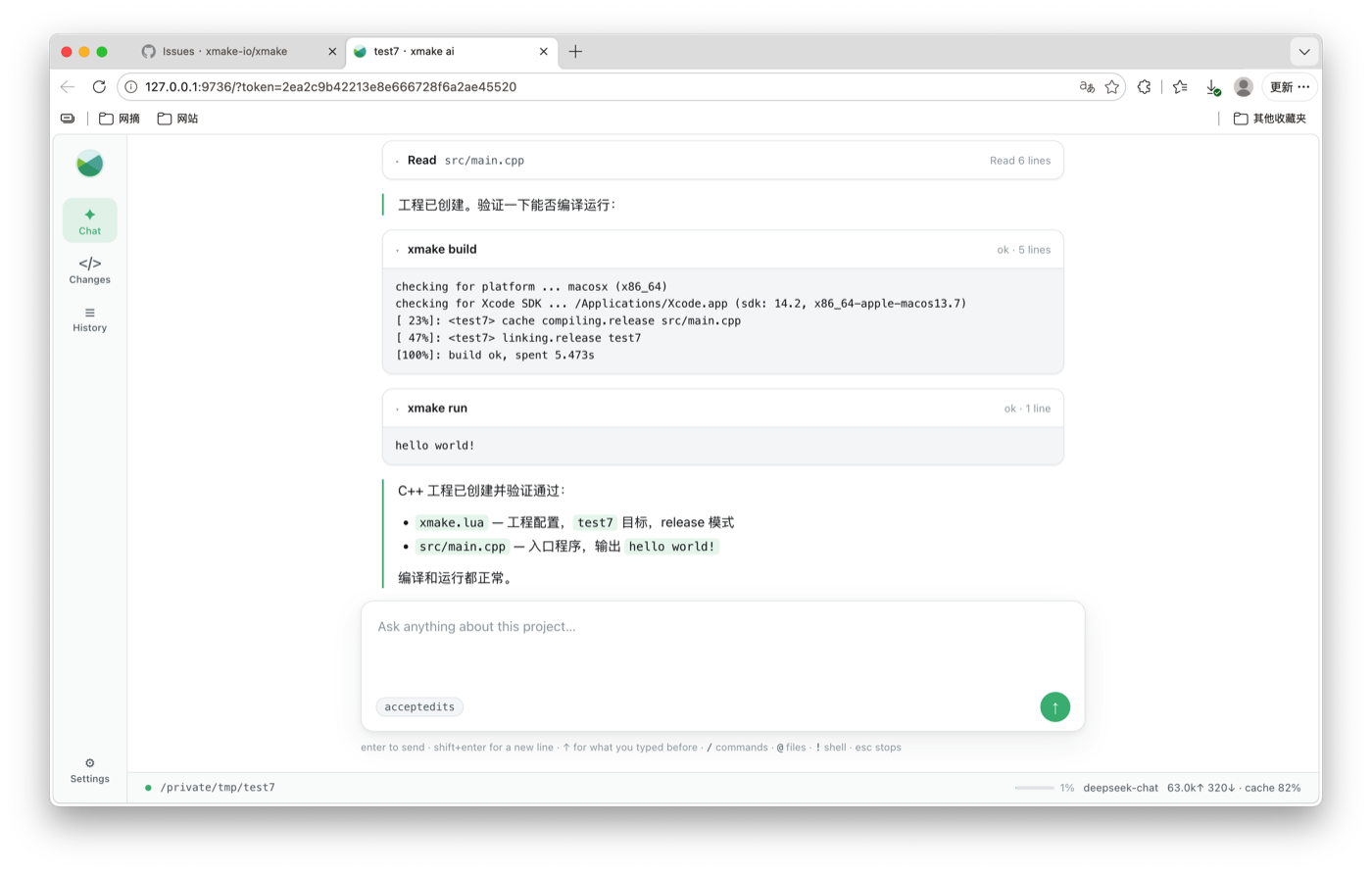
The same harness is behind it as in the terminal — the same tools, skills, permission modes and session files.
It starts as a conversation with the room to itself. When you go to look at what it changed — by clicking a file in the list at the end of a turn, or the button in the corner — it opens out into a workspace: the conversation on the left, the file being read in the middle, the project tree on the right.
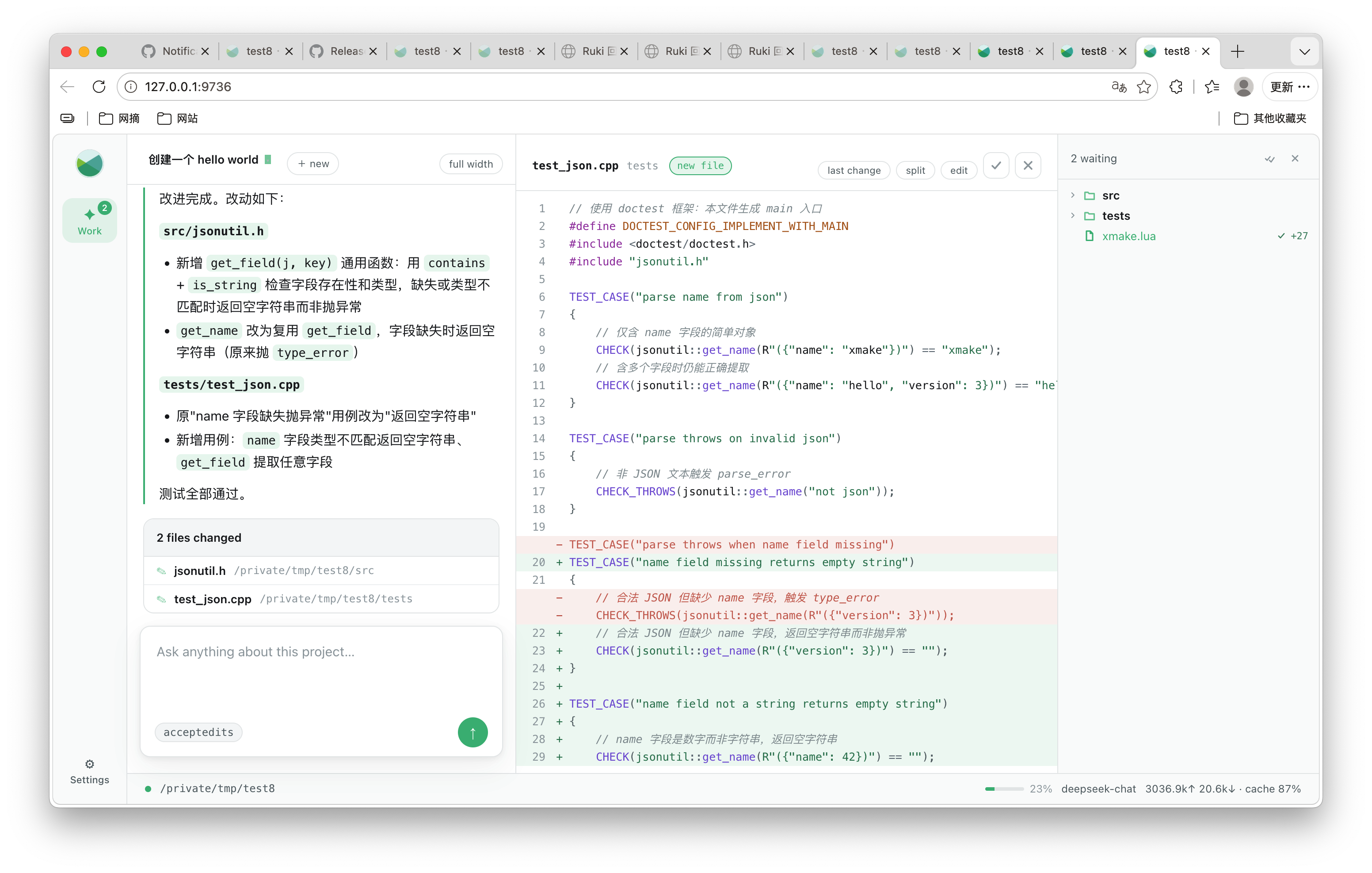
The middle is the file, all of it, syntax coloured, with what this conversation changed marked on it: the lines which came in green, the lines which went in red where they were. It is editable — type in it and save with ⌘S — and a write from the page goes through the same door as a write from the agent, so it keeps a copy of what it replaced and appears in the list of what this conversation changed.
Each changed file has two answers, a tick and a cross at the top right: keep the change, or put the file back the way it was before the conversation touched it. It is a list of decisions and it empties: a file leaves it the moment it is decided about, and comes back if the agent touches it again. The tree marks the changed files with what was done to them and what was decided.
/goal, /loop, the slash commands, @ file attachments and ! shell commands all work here as they do in the terminal. Settings carries the project directory, the theme, the provider, the models, the api keys, and the skills: what is loaded, what packs are installed, and a box to install another.
There is no framework and no build step in it: plain html, css and es modules, served straight from the addon. The markdown is rendered by the harness itself, and the events cross as server-sent events, which browsers speak natively.
The server binds to 127.0.0.1 and demands the token, which lives only as long as the process. The url is not for sharing — this is a service which edits files and runs commands. The api keys are never sent back to the page: it shows whether one is configured and lets you replace it.
/goal make the tests pass works at an objective turn after turn until the agent can say it is reached — the repeating task with its clock taken out — and stops by itself when it is, or when the turn budget runs out.
The slash commands are there too: type / in the box and the list appears. They are the same commands the terminal runs, through an adapter rather than a second implementation, so /compact, /model, /permissions and /xmake build all work — the output of a build comes back as a card in the conversation.
Confirmations work as they do in the terminal, decided by the same policy — the ordinary commands run, and what is hard to undo asks first. The question appears in the conversation rather than as a dialog over it, carries the diff when it is an edit, and is pushed to every open tab.
It adapts to a phone: the navigation moves to the bottom and the changes screen becomes one column.
Permission modes
$ xmake ai --mode=plan           # read-only, it plans before touching anything
$ xmake ai --mode=acceptedits    # auto-accept file edits, still asks before commands
$ xmake ai --mode=bypass         # no prompts at all
$ xmake ai --sandbox             # confine the commands it runs
$ xmake ai --notools             # chat only, no tools
--mode=plan is the sane default when you point it at an unfamiliar repository.
Slash commands
Inside the tui, / opens the command list. The built-in ones:
| Command | What it does |
|---|---|
/xmake | run xmake here without spending tokens, e.g. /xmake build, /xmake run -d |
/xmake-docs | fetch or update the xmake documentation so the agent can look the apis up |
/import | convert a cmake, visual studio, meson or scons project to xmake |
/skills | list, install, update or remove skill packs |
/agents | list, install, update or remove subagents |
/goal | work at an objective until it is reached, e.g. /goal make the tests pass |
/trust | what this directory is allowed to tell the agent |
/reload | read the configuration, skills, subagents and commands again |
/model | show or switch the model, e.g. /model deepseek-reasoner |
/context | show the context breakdown, /context full keeps everything |
/sessions, /resume, /clear | the conversation history, resume one, start a new one |
/jobs | the background jobs it started |
/mcp | the MCP servers it talks to |
/config | show or set a configuration value |
/loop | repeat a task on a schedule, e.g. /loop 30m check the ci |
/rewind | put the files back the way they were before a request |
/memory | what it learned about this project, and forget one |
/diff | hide or show the changes, in a column beside the conversation |
/xmake is the one to remember: the build output goes to your terminal, not into the model's context, so a long compile costs nothing.
Any command also runs without entering the tui:
$ xmake ai --command=doctor
$ xmake ai --command='model deepseek-reasoner'
$ xmake ai --list=skills     # also: agents, tools, commands, plugins, providers, sessions
Sessions and context
Every turn is appended to a log on disk, per project. Closing the terminal loses nothing:
$ xmake ai -c              # continue the last conversation in this directory
$ xmake ai -r              # pick one of this project's conversations
$ xmake ai -r 6a86cfc5     # resume that one
$ xmake ai --new           # start fresh even with -c configured
When the conversation approaches the model's context window it is compacted: the small model writes a summary of the older turns and the log continues from there. /context shows what is taking up the window, /compact summarises now, and /cost shows the tokens spent and the cache hit rate.
Long-running commands
A build which takes twenty minutes should not hold the conversation hostage. Anything slow can run beside it:
- the agent starts it as a background job, keeps working, and collects the output as it arrives
- you can push a command it started into the background yourself with
ctrl+bwhile it runs — it keeps going, the turn continues /jobslists them,/jobs kill <id>stops one
Jobs belong to the session and are all stopped when it ends, so you are never left with a process you did not start and cannot see.
Undoing what it changed
An agent which edits twelve files and gets the eleventh wrong leaves you with no way back except git — and the work which was in the tree before the session started is exactly the work git does not have.
So every write keeps what it replaced. /rewind lists the points you can go back to, one per request which changed something, and /rewind <n> puts every file touched since then back to what it held at that point — including removing a file which did not exist before. It asks first, because anything you changed by hand since then is overwritten too.
It undoes edits and nothing else. Commands the agent ran, files removed through the shell, anything outside the project: none of that is recorded, and a rewind does not pretend otherwise.
Where an answer comes from
When an answer rests on a particular place in the code the agent cites it as src/main.cpp:42, which most terminals turn into something you can click.
The citation is checked against the file before it is shown: one which points at a file that does not exist, or past the end of one that does, is rendered in the error colour. A model which cites a line it never read is more convincing than one which says nothing, and just as wrong.
Agent skills
The harness loads the same Agent Skills as Claude Code. Nothing is bundled: packs are fetched only when you ask, and always from upstream.
/skills                              what is loaded, installed and available
/skills install xmake                a registered pack, e.g. xmake-skills
/skills install github:user/repo     a github repository
/skills install /path/to/my-skills   a local directory (linked, for development)
/skills update [pack]                git pull
/skills remove <pack>                delete it
Installing xmake-skills teaches it the same xmake know-how it teaches Claude Code:
/skills install xmakeA skill is loaded on demand: only its one-line description stays in context, the body is pulled in when the task matches it.
It reads the layouts which exist rather than demanding its own — a Claude SKILL.md directory, a Claude plugin or marketplace, a single-file skill, or a .zip bundle. Two skills wanting the same name is reported rather than silently resolved, and pointing it at a tool you already use links the directory instead of copying it:
/skills install ~/.claude            the claude skills you already have
/skills install ./bundle.zip         a packed bundle
Installed packs are checked against upstream once a day, in the background, and the next start says so. Nothing is ever fetched without you asking.
Bringing an existing project in
A project built with CMake, Visual Studio, Autotools, QMake, Meson or SCons is converted with one command:
/importThe conversion splits in two, and the split is why it is worth doing this way rather than asking a model to read the CMakeLists.txt. The facts — the targets, their kinds, their sources, includes, defines and dependencies — are read deterministically and have exactly one right answer. The judgements — an if(WIN32) that was never evaluated, a find_package(Foo) whose name is CMake's and not xmake-repo's, a flag that is a rule in xmake — are listed with the file and the line they came from, and those are what the agent actually works on.
The compiler flags are translated rather than copied, which is most of what makes a converted file readable:
target_compile_options(demo PRIVATE -fvisibility=hidden -Wall -Wextra -O2 -g -std=c++17 -fPIC)
target_link_libraries(demo PRIVATE m pthread z)target("demo")
set_kind("binary")
set_languages("c++17")
set_warnings("all", "extra")
set_symbols("hidden")
add_files("src/main.cpp")
add_links("z")
add_syslinks("m", "pthread")-O2 and -g are gone because mode.debug and mode.release already set them, and their answer is right on every compiler. -fPIC is gone because xmake does it for shared libraries. m and pthread are the system's; z is not, so it stays and comes with a question — most libraries linked by name should be add_requires, and only xrepo search can say which. Nothing is dropped silently.
It finishes by checking itself: does it configure, does it build, and does it have the targets the original had. A conversion which builds can still be missing one, and that is the check which catches it.
If the project has a compile_commands.json, it checks one thing more — the includes and defines of every file, against what the compiler was actually told:
2 files are compiled differently from what `compile_commands.json` records:
- `src/main.c` (demo): missing includedirs vendor, defines EXTRA=2
Nothing else catches that: a conversion which builds the right targets with the wrong -I compiles, passes every other check, and behaves differently. A compile database on its own is also enough to convert from, when there is nothing else left to read.
Tools, agents and MCP
The agent works through a fixed tool set — reading and writing files, globbing, searching text, running commands, fetching urls, tracking todos, launching subagents — each of them gated by the permission mode. Long-running commands become background jobs (/jobs).
It can also spawn subagents for isolated work — each with its own prompt, tools, model and context window, reporting back only its conclusion — and talk to MCP servers for the capabilities it does not have itself (/mcp).
Several subagents can be handed a whole plan at once: independent explorations run together, whatever needs their reports waits for them, and only the last of them reports back. A wide sweep of the codebase then costs the main conversation a paragraph instead of forty file reads.
Subagents are installed and written the same way skills are:
/agents                              what is loaded, installed and available
/agents install github:user/repo     a pack of them
/agents install ~/my-agents          a local directory
/agents remove <pack>
/agents disable <name>
One is a markdown file with a name, a description and its instructions — or a directory, when it needs more than that:
my-porter/
    AGENT.md            the prompt and the tools it may use
    agent.lua           optional: what it works out before the first request
    skills/             the skills it reads, installed with it
agent.lua is for the agent whose first step is always the same command. The one which converts projects uses it: detecting the build system and reading it are the same answer every time, so it does them before the first request and arrives already knowing what it is looking at.
It may export define, tools, prompt, before, validate, after and cleanup — the points of one run, in the order they happen. validate is the interesting one: it returns nil when the report will do and the reason when it will not, and the agent goes back round once, told what to fix. Use it where the answer has a shape a script can check. Every hook is optional and a script which raises is reported and then ignored.
Where it stores things
~/.xmake/harness/config.json         the user config, including the api keys
~/.xmake/harness/skills/<pack>       the installed skill packs
~/.xmake/harness/agents/<pack>       the installed subagent packs
~/.xmake/harness/projects/<project>   the conversations of that project
~/.xmake/harness/MEMORY.md           what it learned about you
<project>/.xmake-harness/            the project config, its skills, agents and commands
<project>/.xmake-harness/MEMORY.md   what it learned about the project, checked in
XMAKE_HARNESS_HOME moves the harness home somewhere else.
Gotchas
- It needs an api key and network access —
xmake ai --doctortells you what is missing. --printis the only mode safe to run from a script; the tui expects a real terminal.- Prefer
/xmake buildover asking the agent to run the build: same result, no tokens.